
Class
Schedule
Class + Appointment Schedule
Booking on an iPhone
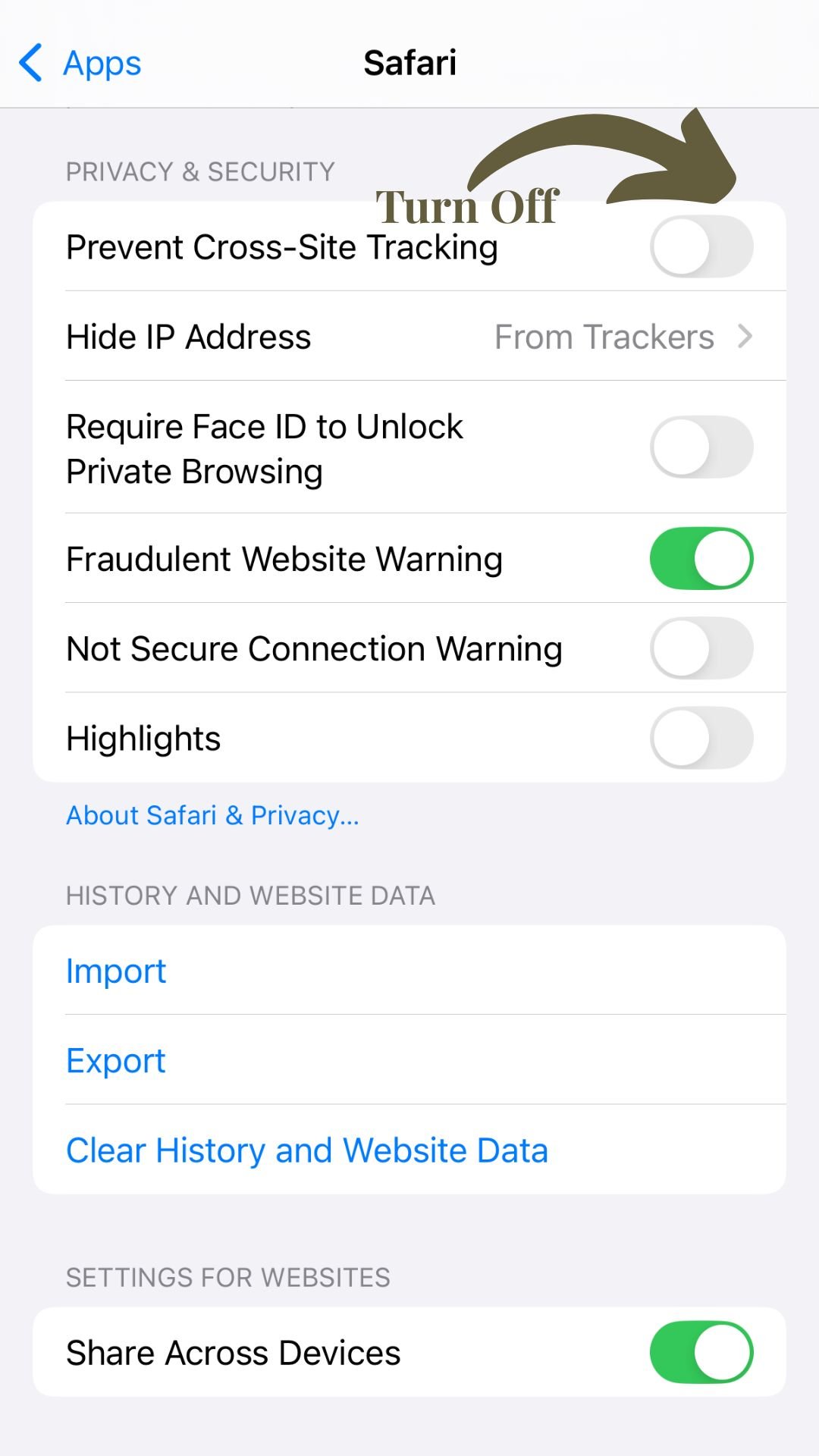
Please ensure Cross-Website Tracking is enabled in your browser’s settings by doing the following.
For Safari: Settings -> Apps -> Safari -> Privacy & Security -> turn off “Prevent Cross-Site Tracking”
For Google Chrome: Settings -> Apps-> Chrome -> turn on “Allow Cross-Website Tracking”

FAQs
-
Our Lincoln Park studio is located at:
2549 N Racine Ave Chicago, IL 60614
Our Lakeview studio is located at:
3000 N Sheffield Ave Chicago, IL 60657
Street parking is available and easy around both studios! We recommend arriving 5-10 minutes before class to locate a spot.
-
Arrive 5-10 minutes early
Bring a water bottle; a refill station is available
Cell phones are not permitted during the session
-
Group Class Policy
Group classes (Equipment and Mat) must be canceled at least 12 hours before the session.All late cancellations will forfeit the class from the package. Unlimited memberships will incur a $10 late fee.
Private + Duet Policy
Private and duet sessions must be canceled at least 24 hours before the session.All late cancellations will forfeit the session from the package.
Please note: Classes are non-transferable and non-refundable.
-
Our Equipment classes have a maximum of 5 people, while our Mat classes can accommodate up to 15.
Can we teach more than that? Sure! However, we've found that these group sizes allow us to give enough attention to each individual and ensure each class offers the best variety possible.
-
Core Chicago Pilates can accommodate all types of injuries, concerns, workout levels, and more. As always, the more notice we have, the better we can help you safely plan for class participation.
Our skilled instructors are happy to coordinate with your care team (doctors, physical therapists, massage therapists, etc.) to ensure we work together to provide you with a comprehensive program that supports your body.
-
Wear comfortable clothing that allows you to move freely. You don’t need a matching set to do Pilates! You can either go barefoot or wear grippy socks, whatever works for you. And bring a water bottle!
-
We kindly ask that you plan to arrive 5-10 minutes before the start of each session.
This helps ensure a smooth start for the group and gives you time to take a deep breath, put your things away, and settle in without feeling rushed.
Late arrivals (more than 5 minutes after the start) will not be admitted in order to avoid disrupting the class.
-
You don’t need to be flexible or "in shape" to start Pilates! Our team all began from ground zero and is dedicated to helping each Core member, no matter their flexibility, fitness level, or strength.
-
Please note that all of our packages expire 6 months from the date of your first class. Unfortunately, we are unable to offer refunds or extensions on any series that have already been purchased.
-
Absolutely! At this time, we do not offer specialized pre-natal classes in the studio. Since every pregnancy and physician’s recommendations are different, we follow the guidelines provided by your doctor to ensure a safe and effective pre-natal Pilates workout.
Please inform us of your pregnancy before attending class so we can plan accordingly.
-
No! Pilates meets you where you are. At Core Chicago Pilates, our instructors complete at least 500 hours of training and are skilled at adapting every exercise to your body and fitness level. Everyone was a beginner once.
-
Contact us
Email: info@corechicagopilates.com
Call or text: 773 - 296- 9660
Lincoln Park: 2549 N Racine Ave Chicago, IL 60614
Lakeview: 3000 N Sheffield Ave Chicago IL 60657
Let’s Connect
Pilates education, class openings, and behind the scenes